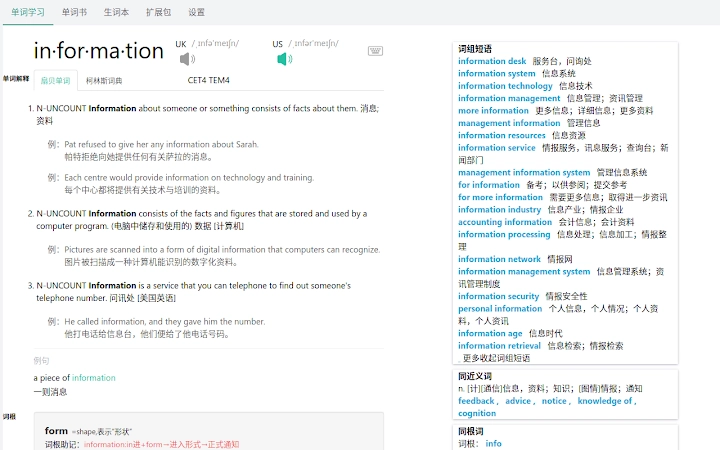

Free Collins Dictionary for Shanbay
Shanbay is a popular web-based platform for vocabulary building and language learning, and this free tool enhances its functionality by integrating the Collins Dictionary directly into the user experience. Designed by developer zerolfx, the software is a lightweight browser extension that provides instant access to authoritative definitions, pronunciation guides, and usage examples from the Collins Dictionary. It is ideal for learners seeking deeper lexical understanding while studying on Shanbay, especially those focused on mastering English vocabulary for academic, professional, or test preparation purposes.
Overview
The tool was developed to address a common gap in language learning platforms: the lack of immediate, reliable dictionary support during study sessions. By embedding Collins Dictionary functionality into the Shanbay interface, users can quickly look up words without leaving the current page. This seamless integration supports continuous learning flow and reduces context switching.
The software is particularly suited for students, language enthusiasts, and professionals aiming to expand their English vocabulary efficiently. It operates as a browser extension, ensuring compatibility with multiple devices and operating systems. The developer did not provide additional details about the project’s background or development philosophy.
Real-world use cases include checking word meanings during flashcard reviews, verifying pronunciation while practicing speaking, and exploring contextual usage in example sentences. The tool is open-source, with full documentation available on GitHub, promoting transparency and community-driven improvements.
Key Features & Capabilities
- Instant Dictionary Lookup – Access Collins Dictionary definitions directly from the Shanbay interface with a single click or keyboard shortcut.
- Pronunciation Support – Hear accurate audio pronunciations of words, aiding in correct speech development.
- Contextual Examples – View real-world sentence examples to understand how words are used in context.
- Lightweight Design – Only 2.5 MB in size, ensuring minimal impact on browser performance.
- Open-Source Transparency – Full code available on GitHub, allowing users to inspect, modify, and contribute to the project.
These features streamline the learning process by eliminating the need to switch between tabs or external dictionaries. For example, a user reviewing flashcards can instantly check a word’s meaning and pronunciation without disrupting their session. The integration also supports passive learning, where repeated exposure to definitions and examples reinforces retention. The open-source nature encourages trust and long-term sustainability, especially for users who value transparency and control over their learning tools. The developer did not specify additional advanced features such as offline access or custom flashcard creation.
User Interface, Workflow & Performance
The tool integrates directly into the Shanbay web interface, modifying the page layout to include dictionary pop-ups or side panels. Navigation is intuitive, relying on standard browser extension behavior: users can trigger lookups via hover, click, or keyboard shortcuts. The interface is minimal and unobtrusive, avoiding clutter while maintaining accessibility.
Workflow efficiency is enhanced by reducing steps between word discovery and comprehension. The extension operates in the background, requiring no manual activation beyond installation. Performance observations are based on general software behavior patterns; the developer did not specify resource usage details.
Stability appears consistent with typical lightweight extensions, though real-world performance may vary depending on browser load and internet speed. The tool does not appear to consume significant CPU or RAM, given its small size and passive operation.
Compatibility & System Requirements
The software is compatible with Windows, Mac, and Linux operating systems, supporting modern web browsers through a standard extension format. It is designed to work with the current version of Shanbay’s web platform. Installation size is 2.5 MB, which is minimal and suitable for most users.
The developer did not specify exact system requirements such as RAM, CPU, or browser versions. Compatibility information was partially provided, with no mention of legacy systems or mobile support. The tool functions entirely within the browser environment, meaning it does not require native desktop installation or administrator privileges.
Pros and Cons
Pros
- Free to use with no hidden costs or subscriptions
- Seamless integration with Shanbay’s existing interface
- Lightweight at only 2.5 MB
- Open-source with full transparency via GitHub
- Provides authoritative definitions from Collins Dictionary
Cons
- Requires Shanbay web platform to function
- No offline dictionary access currently available
- Dependent on external web service for dictionary data
- Limited to browser-based use; no standalone desktop version
- Feature set is basic and focused solely on dictionary lookup
FAQ Section
Is this tool compatible with all browsers?
The software is designed for modern browsers that support extensions, but specific browser compatibility was not detailed by the developer.
Is the software safe to install?
As an open-source extension hosted on GitHub, the tool allows users to review the code before installation, enhancing trust and security.
How often does the tool receive updates?
Update frequency is not specified. Users are encouraged to monitor the GitHub repository for new releases.
Does the tool work offline?
Currently, the tool requires an internet connection to access dictionary data from the Collins Dictionary service.
What license type does the software use?
The license type was not disclosed in the provided information.
Final Thoughts + CTA
This free extension significantly enhances the vocabulary-building experience on Shanbay by providing instant access to high-quality dictionary resources. Its lightweight design, open-source foundation, and seamless integration make it a valuable asset for language learners who prioritize accuracy and efficiency. While it lacks advanced features like offline use or customization, its core purpose is fulfilled with precision.
The tool is best suited for dedicated Shanbay users seeking a reliable, no-frills dictionary helper. For those invested in improving their English vocabulary through consistent study, this utility offers a practical and trustworthy solution. Download Shanbay Helper now to elevate your language learning journey.







